
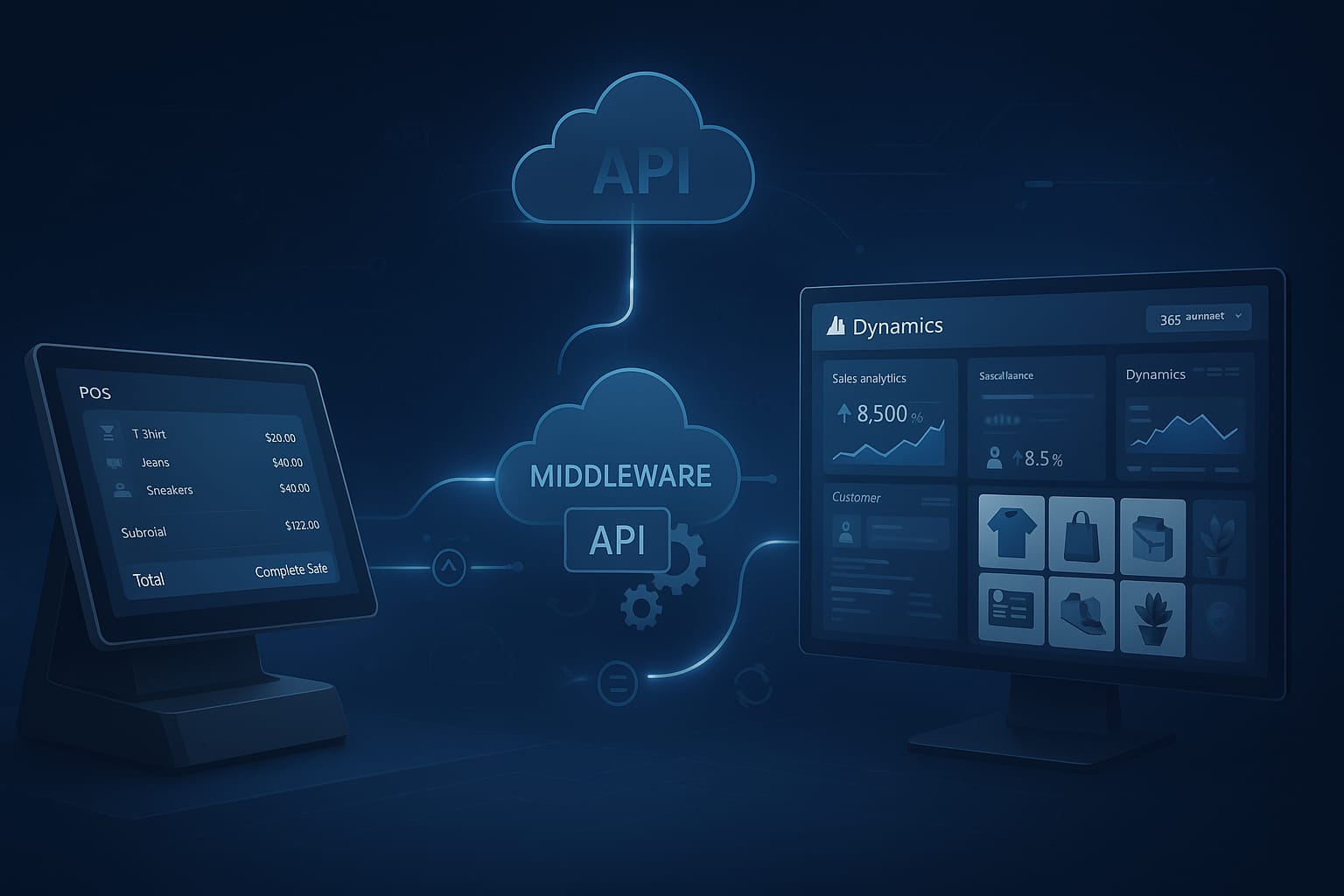
Integrating a modern Point of Sale (POS) system with Microsoft Dynamics 365 is no longer a luxury but a strategic necessity for growing retail businesses across the UAE and GCC region. As businesses transition from legacy systems to more flexible, real-time architectures, understanding the integration layers—API endpoints, middleware orchestration, and data flow models—becomes essential to ensure operational efficiency, customer satisfaction, and scalability.
This guide will walk you through the core components of a retail POS system and how it synchronizes with Microsoft Dynamics 365, especially Dynamics 365 Commerce, using modern architectural patterns.
Why Integration Matters for GCC Retailers
Retailers in Dubai, Abu Dhabi, Riyadh, and across the GCC face increasing demands for seamless omnichannel experiences, real-time inventory visibility, and agile operations. An integrated POS system ensures:
- Unified Customer Experience: Syncs customer data, loyalty programs, and purchase history across in-store and online platforms.
- Real-time Inventory Management: Automatic updates to and from Dynamics for accurate stock counts.
- Faster Checkout and Service: POS devices with integrated product catalogs and pricing logic pulled directly from Dynamics 365.
- Centralized Reporting: A single source of truth across sales, financials, and operations.
Let’s dive deep into the integration layers that enable this synergy.
Overview of Integration Architecture
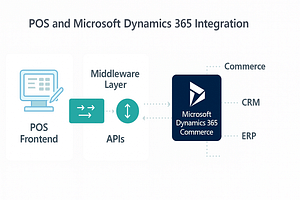
At its core, the integration between a POS system and Microsoft Dynamics 365 Commerce is built on three key architectural layers:
- API Layer – Enables secure and scalable communication between the POS and Dynamics 365 endpoints.
- Middleware Layer – Acts as a broker for data orchestration, transformation, queuing, and error handling.
- Data Flow Layer – Governs how transactional, master, and analytical data moves between systems.
This integration typically involves multiple services and technologies such as:
- RESTful APIs or OData from Dynamics 365 Commerce
- Microsoft Power Platform or Azure Logic Apps for workflow automation
- Enterprise Service Bus (ESB) or cloud-based middleware
- Database sync via Azure SQL or Dataverse
Key Components in Architecture:
- POS Frontend: The interface used by cashiers or staff, typically built in web, mobile, or desktop environments (e.g., iPOS Retail).
- POS Backend: Handles local database, caching, and offline processing.
- Middleware/API Gateway: Queues and validates requests (orders, returns, stock updates, etc.).
- Dynamics 365 Services: Retail server, Commerce Scale Unit (CSU), and Dataverse handle core data operations.
Below is a recommended image to visualize this:
Understanding Data Synchronization Types
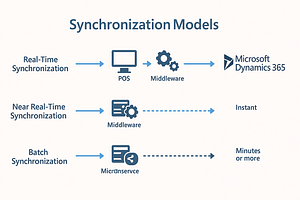
Effective integration between POS systems and Microsoft Dynamics 365 hinges on the proper synchronization of data. Depending on operational needs and technical constraints, businesses may use a mix of the following data synchronization models:
1. Real-Time Synchronization
In real-time sync, transactions and updates flow instantly between POS terminals and Dynamics 365 Commerce. This model is used for:
- Instant inventory deduction upon sale
- Live customer loyalty point validation
- Up-to-date pricing and promotions pulled directly from Dynamics 365
Real-time sync relies heavily on stable internet connectivity and APIs such as OData or custom REST endpoints exposed by Dynamics.
2. Near Real-Time Synchronization
This model involves syncing data at short, regular intervals (e.g., every 5 minutes). It’s ideal when internet connectivity is intermittent but not unreliable. Common uses include:
- Syncing product catalog changes
- Transmitting order confirmations
- Reconciling offline transactions queued on POS
Azure Logic Apps, Power Automate, or a message queue like Azure Service Bus can facilitate this process.
3. Batch Synchronization
Batch sync is used for non-critical updates where large data volumes are processed at specific intervals, such as daily or weekly. Suitable for:
- Master data updates (products, prices, vendors)
- End-of-day sales reports
- Inventory stock count imports
Middleware solutions ensure that data integrity is maintained, and conflict resolution mechanisms are applied when syncing batched updates.
API Layer Deep Dive: Connecting POS to Microsoft Dynamics
The API layer is at the heart of enabling seamless data exchange between a POS system and Microsoft Dynamics 365 Commerce. It dictates what data can be shared, how often, and with what level of security. Let’s explore the key elements of this API architecture:
1. OData API in Dynamics 365
OData (Open Data Protocol) is the standard web API offered by Microsoft Dynamics. It supports:
- CRUD operations (Create, Read, Update, Delete) on entities like Products, Customers, Sales Orders
- Querying and filtering using URL parameters
- Metadata definitions for each entity
It’s often used by middleware to pull configuration data like product catalogs or push transactional records like completed sales or returns.
GET https://[org].dynamics.com/data/Products?$filter=ProductType eq 'Retail'2. Custom REST APIs for POS-Specific Needs
Many retail use cases—especially those involving custom POS workflows—require bespoke REST APIs. These are typically hosted via Azure Functions, Web APIs, or Logic Apps and can:
- Connect directly to custom tables or extensions in Dynamics
- Perform multi-entity writes with validation logic
- Implement token-based access control with OAuth2
3. Authentication & Security
All API calls between POS and Dynamics should be secured using Microsoft Identity Platform (Azure AD) tokens. This ensures only authorized apps and users can interact with ERP data.
- OAuth 2.0 Bearer Tokens: Used to authenticate API requests
- Certificate-Based Authentication: Ideal for headless service-to-service integrations
4. Common API Integration Examples
- Send Sale Transaction: POS → Middleware → SalesOrder API in Dynamics
- Fetch Updated Prices: POS ← Middleware ← OData PriceList endpoint
- Inventory Check: POS → Real-time call to stock availability service

Middleware Orchestration: The Brain of POS-Dynamics Integration
Middleware acts as the intelligent bridge between your POS system and Microsoft Dynamics 365. It’s where business logic, data transformations, retries, queuing, and monitoring happen—ensuring that your integration is not just a connection but a well-orchestrated workflow.
1. Role of Middleware
Middleware platforms—such as Azure Integration Services, MuleSoft, Dell Boomi, or custom .NET/Azure Function solutions—handle critical operations:
- Decouple POS and ERP systems for fault tolerance
- Queue and retry failed transactions (e.g., due to API timeout)
- Perform data transformations and validations before reaching ERP
- Log and monitor every integration event for auditing
2. Common Middleware Services in Azure
- Azure Logic Apps: Drag-and-drop low-code workflows for integrating APIs, databases, and files
- Azure Service Bus: Reliable queuing system for decoupling message exchanges
- Azure Functions: Lightweight event-driven microservices to validate or transform payloads
- Application Insights: Built-in telemetry and logging for real-time issue tracking
3. Key Integration Patterns
- Event-Driven Pattern: POS sends an event (e.g., “Sale Completed”) to a queue → Middleware processes it asynchronously
- Scheduled Sync Pattern: Middleware pulls updates (like stock or pricing) from Dynamics at intervals and pushes to POS
- Real-Time Request/Response Pattern: POS sends real-time API call (e.g., customer lookup) through middleware to ERP
4. Error Handling & Retry Logic
Middleware ensures reliability by automatically handling API failures. For instance:
- Transient errors (e.g., 429 Too Many Requests) → Retried with exponential backoff
- Critical failures → Logged and escalated to admin dashboards or email alerts

Data Flow and Synchronization Strategy
Effective data synchronization between POS systems and Microsoft Dynamics 365 Commerce is essential for maintaining business continuity, minimizing human error, and providing real-time visibility into operations.
1. Types of Data Being Synchronized
The integration involves both master and transactional data flowing in multiple directions. Here’s a breakdown:
- From Dynamics to POS: Products, pricing, discounts, customer profiles, promotions, inventory levels
- From POS to Dynamics: Sales transactions, customer sign-ups, loyalty points, returns, feedback
2. Real-Time vs. Batch Synchronization
- Real-Time: Used for high-priority interactions such as gift card validation, price lookup, and loyalty redemption.
- Batch (Scheduled): Used for less time-sensitive data such as syncing the day’s sales or updating new product catalogs overnight.
Combining real-time and scheduled strategies ensures a balance between system performance and operational accuracy.
3. Techniques for Reliable Sync
- Webhooks: Push updates instantly from POS to middleware/Dynamics
- Polling APIs: Middleware checks for changes on a schedule (e.g., every 5 minutes)
- Change Tracking: Use Dynamics 365’s OData Change Tracking or Delta Queries to optimize API usage
- Transactional Logs: Capture POS events locally and sync when internet is available (offline-first approach)
4. Conflict Resolution & Data Prioritization
Conflicts can arise—e.g., when inventory is updated in both systems. Solutions include:
- Priority Rules: Let ERP be the source of truth for master data, and POS for transaction data
- Middleware Reconciliation: Store both versions temporarily and apply resolution logic (e.g., last update wins, or notify for manual review)

Security, Monitoring, and Best Practices
Building a successful integration between your POS system and Microsoft Dynamics 365 Commerce isn’t just about data flow and middleware. Long-term reliability, compliance, and performance hinge on robust security, proactive monitoring, and architectural best practices.
1. Security Measures
- OAuth 2.0 Authentication: All API interactions should use secure token-based authentication (Microsoft Identity Platform, Azure AD)
- HTTPS Everywhere: Never allow data in transit over unencrypted channels; force SSL/TLS on all communication layers
- Data Encryption: Encrypt sensitive data at rest using AES-256 and comply with GDPR/local regulations
- API Rate Limiting & Throttling: Protect endpoints from abuse and unintentional overload
- Audit Logs: Track user activities, API calls, sync attempts, and permission changes
2. Monitoring & Error Handling
- Middleware Logs: Log every transaction and sync event with detailed context (timestamp, origin, status, error trace)
- Alerts & Thresholds: Set up monitoring tools like Azure Monitor, Log Analytics, or third-party platforms (e.g., Datadog, Sentry)
- Retry Logic: Built-in retry mechanisms for temporary failures like network timeouts or token expiries
- Fallback Mechanisms: Queue transactions for retry later if the Dynamics 365 system is temporarily down
3. Best Practices
- Use Decoupled Architecture: Ensure the POS can function offline or independently if the ERP or cloud is unreachable
- Version APIs: Support backward compatibility when Dynamics APIs evolve
- Normalize Data: Align SKU, pricing, and store identifiers across platforms to prevent mismatches
- Documentation: Maintain detailed integration documentation, including field mappings, workflows, and contact protocols
- Compliance Checks: Regularly audit for PCI-DSS, GDPR, and regional tax compliance rules (especially in the UAE & GCC)

Conclusion
Integrating a POS system with Microsoft Dynamics 365 Commerce demands strategic planning and technical precision. From designing robust APIs and selecting the right middleware to ensuring reliable data synchronization and monitoring, each layer plays a vital role in operational success. For retail and hospitality businesses in the UAE and beyond, this integration can unlock real-time insights, smoother customer experiences, and scalable growth.
Need help with implementation? Contact iPOS Software—our experts can guide your Dynamics 365 Commerce integration journey from start to finish.